

Key Metrics
Project Overview
Executive Summary
Standard ERPNext excels at inventory sales and manufacturing, but lacks native architecture for rental and lease operations where items leave, accrue fees on varied time scales, require security deposits, and return for inspection. Lease Hub is a custom Frappe v15 application that introduces a full-fledged rental lifecycle engine into ERPNext. It automates every phase of asset leasing: customer intake through a public web form (/apply-rental), dynamic rental request triaging, automated customer record creation, intelligent booking with hourly/daily/weekly/monthly rate matrix lookups, live deposit balance calculations, automated legal ERPNext Contract generation, and comprehensive checkout inspection checklists upon item return. Built solo in 3–4 weeks, Lease Hub transforms ERPNext into a dedicated, enterprise-grade equipment and vehicle rental solution.
Business Context & Challenges
Rental companies operating fleet vehicles, heavy industrial machinery, AV camera equipment, or event gear face complex operational requirements that off-the-shelf ERPs cannot handle without extensive manual effort. Key bottlenecks included: calculating prorated charges across mixed rental durations (e.g. hourly vs daily vs weekly vs monthly); preventing double-booking of high-value assets; managing security deposits and tracking remaining balances in physical tills; binding renters to legal contracts; and ensuring thorough equipment check-in/check-out inspections before refunding security deposits. Without a dedicated module, teams relied on disconnected spreadsheets, paper inspection forms, and manual invoice reconciliations, leading to billing disputes and lost equipment. Lease Hub was engineered to centralize this entire operational chain inside a cohesive Frappe desk workflow.
Key Objectives
- Engineer a Rental Booking DocType as the core transaction engine, supporting multi-item reservations, customer link, address capture, and live booking status state machine (Draft, In Progress, Active, Completed, Closed)
- Implement custom fields on standard ERPNext Item masters (is_rental_item, rental_status, hourly_rate, daily_rate, weekly_rate, monthly_rate, replacement_rate, last_maintenance_date, next_maintenance_due) to support dynamic rate resolution
- Develop a Rental Request intake workflow with client-side customer matching by mobile and email, auto-generating new ERPNext Customer records if absent, and promoting requests into active Rental Bookings
- Build a dynamic duration and cost engine in JavaScript that recalculates exact durations (hourly, daily, weekly, monthly) and prorates line-item costs on every timestamp modification
- Design real-time asset availability query filters that exclude rented or maintenance-locked items and block duplicate selections within the same booking document
- Create a Deposit Payment ledger child table tracking till ID, timestamp, channel, account number, and amount, recalculating deposit_amount and remaining_amount in real time
- Integrate one-click ERPNext Contract generation, mapping customer, booking ID, dates, and terms into a legally binding document directly from the booking interface
- Build a Rental Item Return and Checkout Checklist module with inspection items, pass/fail ratings, and damage notes to safeguard asset integrity prior to deposit refund
- Publish a responsive, login-free Frappe Web Form (route: /apply-rental) enabling corporate clients and individual renters to submit equipment leasing requests online 24/7
System Architecture
Lease Hub is built as a native Frappe v15 app (leasehub) extending ERPNext core DocTypes via fixtures and domain-specific schemas:
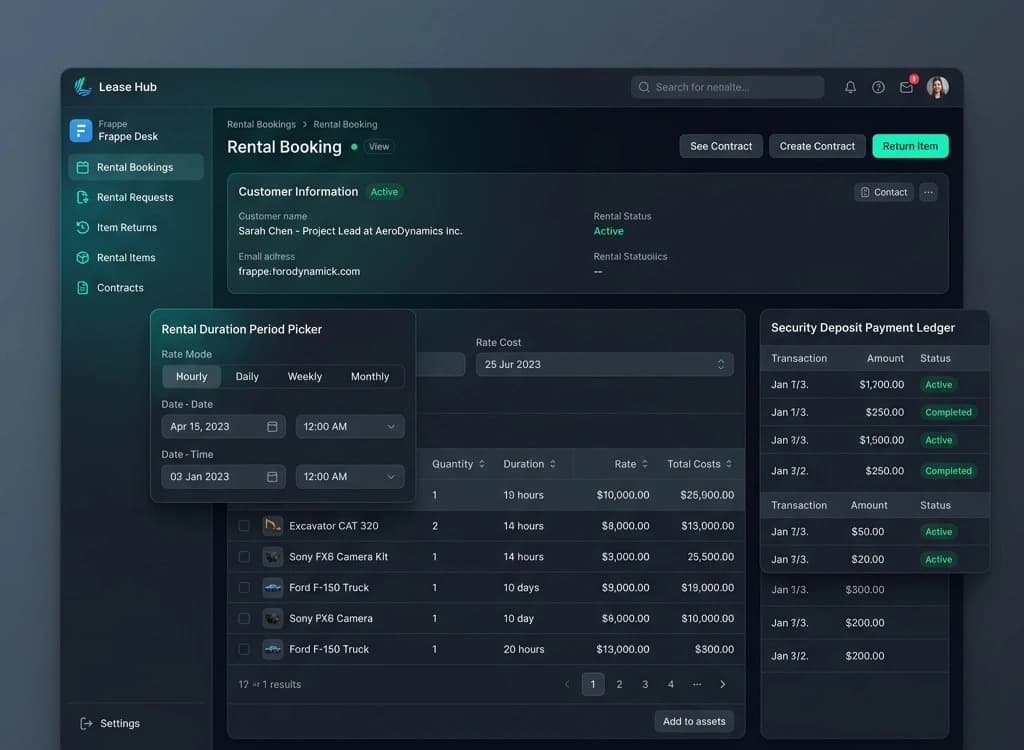
- Rental Booking: Central operational hub. Features real-time state machine logic (update_booking_status) comparing rental_start and rental_end against current datetime to transition booking status between Active and Completed, while automatically flipping linked Item custom_rental_status between 'Rented' and 'Available'. Includes sync toggles (sync_rental_period, sync_rental_based_on) that cascade parent dates and billing intervals down to all child rows.
- Rental Request & Automated Intake: Front-office triage DocType. On clicking 'Make Booking', client-side automation queries ERPNext Customer by mobile_no and email_id. If found, it links the customer and opens a Rental Booking; if not found, it executes frappe.client.insert to create a new Customer record on the fly.
- Item Rate Matrix & Master Extensions (custom_field.json): Enriches ERPNext Item master with dedicated Rental Info tab break, boolean is_rental_item flag, rental status dropdown, and multi-tier pricing fields (custom_hourly_rate, custom_daily_rate, custom_weekly_rate, custom_monthly_rate, custom_replacement_rate).
- Deposit Payment Ledger: Embedded child table recording multi-channel security deposit transactions (cash tills, bank transfers, POS terminals). Computes total deposit and deducts from rental_cost to display remaining_amount dynamically.
- ERPNext Contract Integration: One-click create_rental_contract maps booking details into native ERPNext Contract DocType, bridging operational reservations with legal and accounting compliance.
- Rental Item Return & Inspection: Checkout Checklist child DocType captures structured inspection criteria, rating scores, and damage notes before releasing deposits and closing bookings.
- Global Rental Settings: System-wide master defining minimum and maximum allowable durations for each rental interval mode.
- Rental Workspace: Dedicated Frappe Desk workspace with 'Rental Bookings Chart' and quick-action shortcuts for Bookings, Returns, Requests, Rental Items, and Contracts.
Role-Based Access & Security
Lease Hub leverages Frappe's granular Role-Based Access Control to partition operational duties. Rental Desk Agents have permission to process Rental Requests, view Available inventory, create Rental Bookings, and take security deposit payments. Warehouse & Inspection Technicians are restricted to Rental Item Return, Checkout Checklists, and Item maintenance status updates. Rental Managers and Accounts personnel retain authorization for Contract approvals, deposit refunds, rate matrix adjustments, and global Rental Settings. System Managers and Administrators oversee complete ledger integration and ERPNext financial syncing.
Automated Workflows & Logic
Lease Hub automates time-consuming leasing workflows through Frappe client-side scripts and event hooks:
- Intelligent Customer Auto-Provisioning: Validates renter contact credentials via frappe.client.get_list; non-registered clients are automatically created in the Customer master with standard classification without requiring staff to navigate away.
- Real-Time Duration & Cost Computing: A JavaScript event handler calculates elapsed time differences in milliseconds, converting duration into precise fractional hours, days, weeks, or calendar months, multiplying against the Item's active rate tier.
- Date & Period Cascade Sync: When sync_rental_period or sync_rental_based_on are enabled, modifying booking header dates automatically updates every row in the rental_booking_item child table and recalculates totals instantly.
- Duplicate & Availability Query Guard: Custom get_query handlers on the item selector restrict results to custom_rental_status == 'Available' and dynamically exclude items already added to the current transaction grid.
- Automated Contract Prefill: One-click action extracts party credentials, booking identifiers, and rental time bounds to instantiate an ERPNext Contract without manual copy-pasting.
- Dynamic Status Reconciliation: Real-time clock comparison updates booking status to Active and marks items as Rented as soon as rental periods begin, returning items to Available status upon completion.
UI/UX & Design System
Lease Hub follows Frappe v15 Desk human interface guidelines, enhanced with modern ergonomic touches. Clear visual status tags (Active in vivid emerald, In Progress in amber, Completed in sapphire) provide instant status recognition across list and form views. Dense forms are structured logically with collapsible sections and dedicated tabs: Customer Details, Rental Period, Accounting & Deposits, Leased Items Table, and Return Checklists. The public Web Form (/apply-rental) delivers a clean, responsive, mobile-optimized experience matching modern digital rental storefronts.
Business Impact
- Architected and delivered an enterprise-grade equipment and asset rental ERP app for Frappe v15 as a solo engineer in 3–4 weeks
- Eliminated multi-tier billing errors by automating mathematical duration calculations across hourly, daily, weekly, and monthly rates
- Prevented costly equipment double-bookings with real-time dynamic inventory availability filters in reservation child tables
- Streamlined renter onboarding by automatically verifying or creating ERPNext Customer records directly during request conversion
- Enforced financial and asset safety through an integrated deposit ledger and structured pre-return checkout inspection checklist
- Integrated seamless 1-click legal compliance by generating linked ERPNext Contracts directly from rental reservations
- Delivered 24/7 self-service equipment booking capabilities via a public-facing Frappe Web Form (route: /apply-rental)
Key Outcome
"Completely eliminated pricing errors and double-bookings, automated customer registration and contract generation, and launched a 24/7 public self-service rental application portal."